Everything your PDF signature needs. Certificate-based PDF signing on Windows, Ubuntu and Debian: PKCS#12 files, PKCS#11 USB tokens and the Windows certificate store, visible signature placement, DocMDP certification levels, RFC 3161 timestamps and long-term validation.
Sign with your own certificate.
Digitally sign a PDF on Windows or Linux with your PKCS#12 / PFX certificate file, or with a USB signing token through its manufacturer’s PKCS#11 driver. On Windows, certificates in the Windows certificate store work too.
A desktop signer, not a cloud upload.
Open and sign documents in the Dragdox desktop app on Windows, Ubuntu or Debian. This website never uploads, stores or signs your PDFs.
Place a visible signature anywhere.
Drag a signature rectangle on any page, or use an existing signature field, and customize the visible text or graphic.
Verify signatures and certificates.
Inspect signature and certificate details on signed PDFs. Trust depends on the certificate, its chain and the verifier’s settings.
Activate in one step, move it when you change computers.
Paste your license key in Settings while online — no account or sign-in. A license runs on one computer at a time and can be moved to a new computer up to two times; a reinstall counts as a move.
Timestamps, LTV and certification levels.
Premium adds RFC 3161 timestamping and LTV with embedded CRL revocation data. DocMDP certification levels control what a signed document still allows.
Your desktop. Ready to sign.
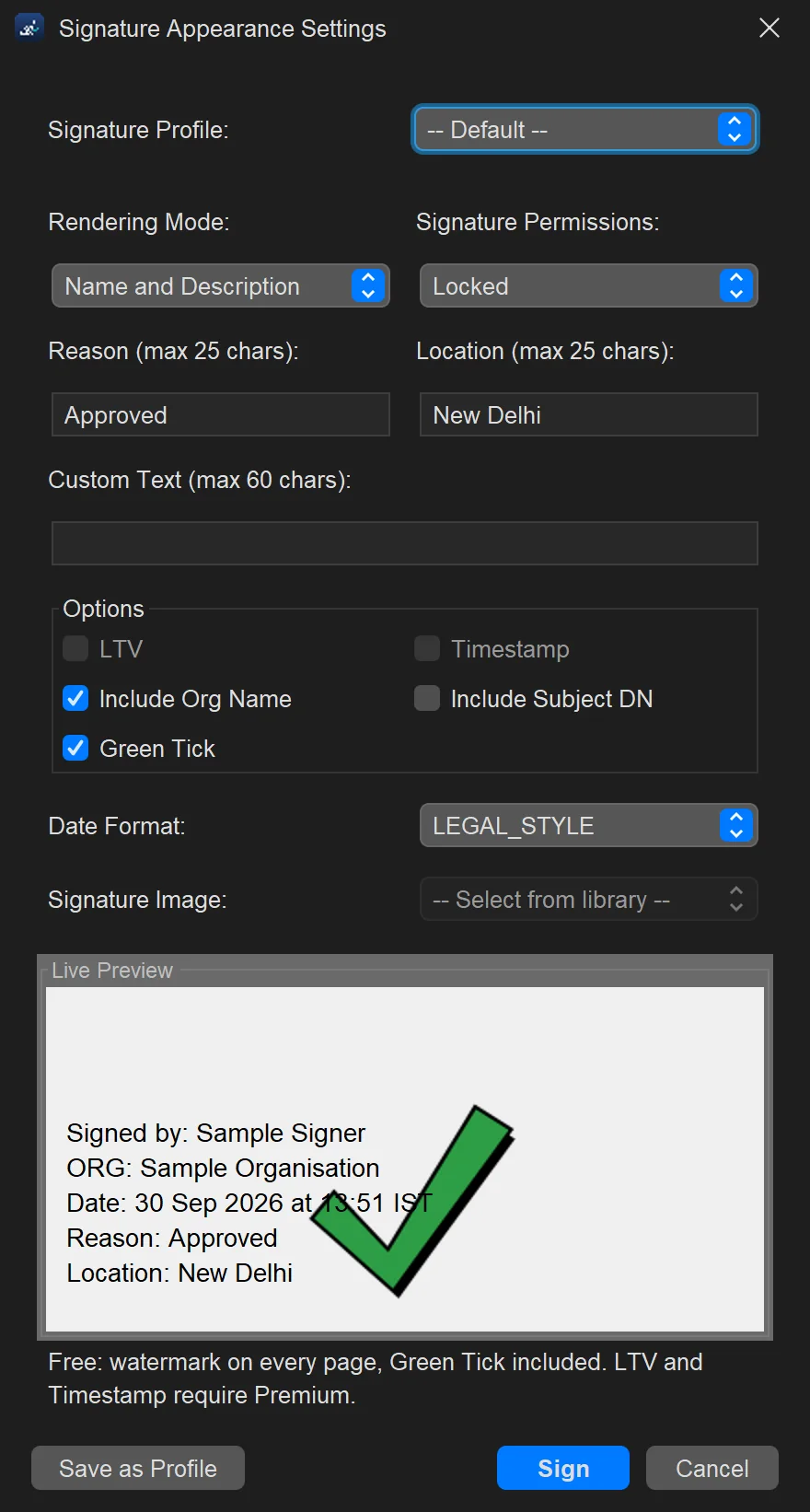
This is the actual Dragdox signing interface, captured during our Debian package tests. Choose your certificate, adjust the appearance, then save the signed copy.
Signature appearance in the free version: Green Tick is included, LTV and Timestamp need Premium. Sample certificate.
Using a USB signing token? Configure its manufacturer’s PKCS#11 driver in Settings (.dll on Windows, Linux amd64 .so on Linux); on Windows you can also pick certificates from the Windows certificate store. Physical tokens and vendor drivers were not part of the package tests. Test your device with the free version first.
PAdES signatures, timestamps and long-term validation
Acrobat has no current Linux release. Dragdox does the signing part on Ubuntu and Debian — and on Windows — and writes the same standard signature a Windows or macOS Acrobat user would.
PAdES signatures, not a picture of a signature
Dragdox writes an ETSI.CAdES.detached signature into the PDF — the PAdES standard Adobe Acrobat and Acrobat Reader read and validate. It is a real cryptographic signature over the document, not a pasted image.
The same two digital-ID sources
Sign from a PKCS#12 / PFX certificate file, or from a USB signing token through its manufacturer’s PKCS#11 library — the two certificate sources Acrobat also signs from.
Certification levels, timestamps and LTV
Sign for approval, or certify with DocMDP so the document allows no changes, form filling, or form filling and annotations. Premium adds an RFC 3161 timestamp and embeds the certificates’ CRL revocation data for long-term validation.
What this does not claim. Dragdox is a dedicated signer, not a full PDF editor: there is no OCR, page editing or form designer. Adobe, Acrobat and Acrobat Reader are trademarks of Adobe Inc. Dragdox is an independent product, and is not affiliated with, authorized by or endorsed by Adobe.
Put your name on it.
Download Dragdox. Bring your certificate. Make it official.